Sunday, 22 November 2009

Painters With Light Exhibition opens in Loughton


Sorry for not updating the blog for a few weeks. It has been a hellishly busy few weeks with tearing one exhibition down & delivering all the pictures sold and then preparing another new exhibition.

This exhibition "Landscape" features work from The Painting With Light Society with guest photographer Kevin Goodchild. It is an exhibition of Landscape images from across the British Isles and beyond. The exhibition runs until Christmas Eve and even if I say so myself it is well worth a visit:

Landscape - an exhibition by The Painting With Light Society featuring Kevin Goodchild
Loughton Library

Traps Hill
Loughton
Essex IG10 1HD

Telephone: 020 8502 0181


Opening Times:
Monday: 9.00 - 7.00
Tuesday: 9.00 - 7.00
Wednesday: 9.00 - 7.00
Thursday: 9.00 - 7.00
Friday: 9.00 - 7.00
Saturday: 9.30 - 5.30
Sunday: 11.00 - 3.00

If that is too far away The Painting With Light Society also have another exhibition "Images of East Anglia" running at

The Virgina Court Hotel
Cliff Avenue
Cromer
Norfolk
NR27 0AN

If you are in the area of either of our exhibitions, please pop in and why not post your reaction here.

Sunday, 1 November 2009

Tim Parkin is photographer of the month for November

I've been really enjoying the Large Format work of Tim Parkin, so I thought - lets make nim my Tog of the month and more people can enjoy it.

Floaty Branch
(by Tim Parkin)


Previous Photographers of the Month

Wednesday, 28 October 2009

Lightroom Archive format - TIFF or PSD ?

Having established that it would be a good idea to save the result of any editing I do in Lightroom in to an archival format, an email flooded in asking why I chose tiff format rather than psd.

Well my gut feel is that tiff is a well understood format supported by lots of vendors, whereas psd seems to be a bit more tied into Photoshop. But my guts and their feelings are not of interest to most right thinking people. So I can do no better than quote this post by Jeff Schewe:

.PSD is now a bastardized file format that is NOT a good idea to use. Even the Photoshop engineers will tell you that PSD is no longer the Photoshop "native" file format. It has no advantages and many disadvantages over TIFF.

TIFF is publicly documented, PSD is not. That makes TIFF a preferred file format for the long term conservation of digital files.

TIFF uses ZIP compression for max compression, PSD uses RLE which if you save without the Max compatibility will be a bit smaller, but at the risk of not being able to be used by apps, like Lightroom.

TIFF can save EVERYTHING a PSD can save including layers, paths, channels, transparency, annotations and can go up to 4 GIGS in file size. TIFF can save all the color spaces PSD can. The ONLY thing I can think of that PSD can save that currently TIFF can't save is if you Save out of Camera Raw a cropped PSD, you can uncrop the PSD in Photoshop CS, CS2 or 3. That's one tiny obscure thing that PSD can do that TIFF currently doesn't. How many people even knew that let alone use it?

PSD used to be the preferred file format back before Adobe bastardized it for the Creative Suite. The moment that happened, PSD ceased to be a Photoshop "native" file format. PSB is the new Photoshop "native" file format for images beyond 30,000 pixels. And , at the moment, only Photoshop can open a PSB.

Getting back to the fist point, Adobe can do anything including stopping support for PSD because it's a proprietary file format. TIFF is public, even if it's owned by Adobe (by virtue of the Aldus purchase). Even if Adobe went belly up tomorrow, TIFF would continue.

And, let me be blunt, anybody who thinks PSD is "better" than TIFF is ignorant of the facts. If Adobe would let them, the Photoshop engineers would tell you to quit using PSD. Lightroom for the first beta did NOT support PSD and Hamburg fought tooth and nail to prevent having to accept PSD. He blinked, but you still can't import a PSD without Max compat enabled-which basically makes it a TIFF with a PSD extension.

Look, I'll make it REAL simple...

TIFF = Good
PSD = Bad


Ok?


If only Jeff wouldn't sit on the fence so much, we would know what he really felt about the matter!

Saturday, 24 October 2009

Crabgate!

So the winners have been announced for Landscape Photographer of the Year and there are some extremely competent and stunning images in the book and exhibition.

On a personal note I was very happy to be shortlisted for this and this - but they didn't make the final cut.

Looking at the winners I was surprised to see this image as one of the finalists:

Hermit Crab by Brian Griifiths

My initial reaction was that it owed more to Photoshop than nature. it seems that I wasn't alone in this assumption as photography forums exploded in a series of discussions about it. My favourite is the dissection by Tim Parkin on Flckr.

I am naive enough to feel that a landscape photograph should be a representation of the scene at the time and not just be the basis for freestyling in photoshop. My opinions don't really matter, but how this got to a final in a competition where one of the rules is:

The integrity of the image must be maintained and the making of physical changes to the landscape is not permitted (removing fences, moving trees, stripping in sky from another image etc). The organisers reserve the right to disqualify any image that they feel lacks authenticity due to over-manipulation.
,is beyond me!

There are an awful lot of great shots in the competition, so I hope this doesn't detract from the award and exhibition. I would love to hear your opinion, should this shot have been a winner ?

Friday, 23 October 2009

Lightroom - Do I need to save my edited shots?

So, as regular readers will be aware, I am slowly moving my workflow to Lightroom. It's a fun project and has given me the opportunity to reassess the way I currently work & compare it with other photographers.

My goal, is to follow "best practice" for digital image management whilst minimising the amount of work I actually have to do in front of the computer. So I am spending a lot of time reading blogs, books & forum posts as to how others manage their workflow and working out which will be right for me.

One of the considerations a digital photographer has to take into account is how many copies of each image to store. If you are not careful it can easily become a nightmare. First you have your original raw file. Then you might have one or two tiff files associated with it as your finally developed image. Finally you end up with s numerous jpgs sized for various output mediums (web, print, magazine submissions, etc). If your not careful it could all end up looking like the tide line on a Cornish Beach:
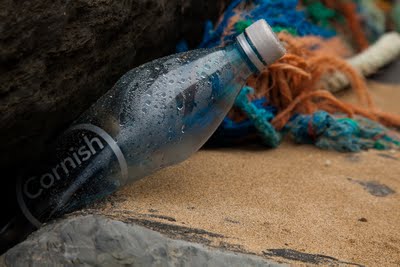
Cornish Crap
(Click to view large)

A while back I decided that I would only keep the original raw file & the finished tiff file for each of my images. Using QImage I could print the tiff file in any size I choose, so there was no need to store versions at different print sizing. Jpgs are really just an output format, so I don't keep them as they can be recreated at any time from the tiffs.

So for a long time I have had only one version of my images (the tiff) , I kept the raw files so I can go back to the raws if I need to, and all is right with the world. But then along came Lightroom2 and it's targeted adjustments...

One of the big things that you hear about Lightroom2 is that it features "Non-destructive editing" . Unlike photoshop, your original image is safe no matter what you do to it as all that is stored is your original image and a history of the changes you made to it. In order to undo something you just go back as far a you like in that history. For people who shoot jpgs this is a major advance - your originals are safe with Lightroom. For Raw shooters it's really not such a big deal, no raw converter changes your raw files, they simply generate a tiff or a jpg.

But Lightroom's target adjustments change the rules. You can (in a lot of circumstances) just use the Lightroom tools to make the adjustments and never need to go into Photoshop. From Lightroom I can print, show it in a slide-show and even generate any jpgs I might need to send out. So now I only need Lightroom and my raw files - it's time to say goodbye to storing tiff files. This has to be a good thing...doesn't it?

Well as i see it Lightroom is storing a set of instructions on what to do with your image very much like a recipe book tells you what to do with raw ingredients. As we know with recipes, two cooks can follow the same recipe and produce 2 different results, or if the recipe is in English and the chef only speaks French you are going to have lots of problems. Does the same hold true for the recipes we have in Lightroom? Well yes I believe it does.

If our recipe for the perfect picture includes the instruction "increase vibrancy by 30", none of us outside of Adobe really know what calculations Lightroom performs on our files. In a few years time when you are running Lightroom 5.3 on Windows 11 (or OS-X Domestic Moggy or even Google Spangled Metal 3), you have no real guarantee that "increase vibrancy by 30" will produce the same look as it did back in 2009. I am sure Adobe would do their best to keep things consistent but it's not easy to guarantee that as developers try to fix bugs in the code and extend it to add more functionality.

Even more importantly, what happens if Adobe drop support for Lightroom due to it rapidly losing market share to some other new technology coming along? What if it becomes to costly to continue to support the raw format of your files? Now we are in a much, much worse position than we ever were, as now we have an archive of raw files in a proprietary format plus a set of instructions in an equally proprietary format that it may be difficult (if not impossible) to get any other software to understand.

That's why, to me, storing raw + lightroom adjustments is just not an archival format as it cannot be opened by other applications and may produce different result over time. Tiff files I created 5 years ago in Photoshop 7 still open and print just as they always did and I can use a wide variety of software to access them. It's an open and widely used standard, so I think I will be sticking with Tiff files as my format for the moment.

Am I right? why not add a comment below & let me know what you think.

Tuesday, 20 October 2009

What are we doing to our home ?

It was only a few weeks back that I walked along the high tide line of a Cornish beach and was amazed at the amounts of plastic that were washed up on the shore.

Today I came across this set of images by Chris Jordan which graphically and shockingly shows what a real mess we are making of our home planet.


Midway - Message from the Gyre
by Chris Jordan

I wonder if it is too late to put things right, or are we destined to spend our days surrounded by a sea of our own filth.

Monday, 19 October 2009

Can a picture be Cursed ?....Part 2

Having previously established that one of my photographs was clearly evil and did not want to leave the house. I had decided to replace it for my latest exhibition.

The strange thing is that it turned out that the new portrait image was exactly the right orientation for the display. If I had gone with the original landscape image the hanging would have looked completely wrong.

Even weirder, no sooner had I hung the new picture up than someone asked to buy it!

Clearly, it wasn't a cursed picture it was just trying to stop me doing the wrong thing.

Spooky!!!

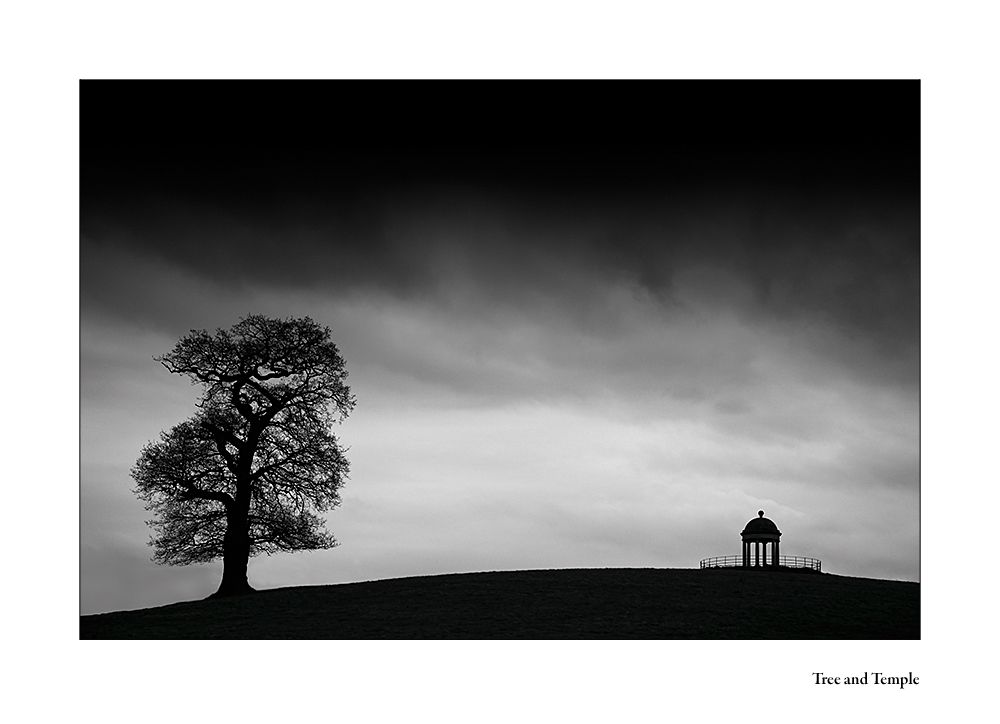
Tree and Temple
(not an evil picture after all, just a very helpful one)